| 1 |
Go to Intel Web Invoice.
|
| 2 |
Click Create Credit Memo link.
|
|
Result: The Create New Credit Memo screen will be displayed.
|
| 3 |
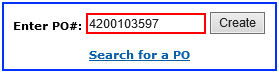
Enter PO number.
For example, 4200103597.
|
|
Note: You must enter the entire PO number in the PO field for Intel Web Invoice to retrieve the requested information and in order to continue.
|
| 4 |
Click Create button.
|
|
Result: The credit memo for PO number entered will be created.
|
Notes:
- The credit memo generated requires supplier to fill in additional mandatory fields.
- The supplier assumes responsibility to submit complete and accurate invoices.
|
| 5 |
Update the mandatory fields,
- Credit Type
- Supplier Original Invoice Number
- Credit Number
- Ship Service Date
- PO Line
- Credit Description
|
| 6 |
Click Review Credit Memo button.
|
|
Result: The Review Credit Memo screen will be displayed.
|
|
Note: The errors and missing fields will be notified in red.
|
| 7 |
Click Submit Credit Memo button.

OR,
Click Edit Credit Memo button for amendment.
|
|
Result: The Credit Note screen will be displayed.
|
|
Note: Supplier may print a copy of the generated invoice confirmation.
|