|
|
| Account Management Self Help | |
| Browse through the navigation panel for the information you are interested in. | ||||||

|
|
|
|
|||

| Step | Action |
| 1 | Go to supplier.intel.com. |
| 2 |
Click Sign In.
|
| Result: The Intel Login page is displayed. | |
| 3 | Enter your User ID and Password. |
| 4 | Click Sign In. |
| Result: The Supplier Information page is displayed. | |
| 5 |
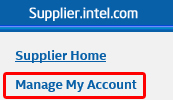
Click Manage My Account.
|
|
Result: The Manage my Account page is displayed. Note: Navigate through that page to update and/or manage your account. |
| Step | Action |
| 1 | Go to supplier.intel.com. |
| 2 | Click Sign In > enter your User ID and Password > click Sign In. |
| Result: The Supplier Information page is displayed. | |
| 3 |
Click Manage My Account.
|
| Result: The Manage my Account page is displayed. | |
| 4 |
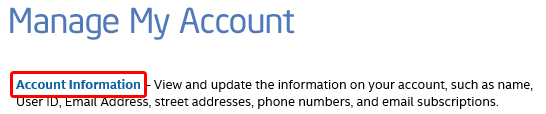
Click Account Information.
|
| Result: The Account Information page is displayed. | |
| 5 |
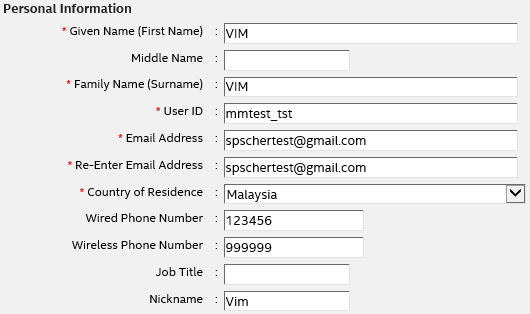
(Optional) Update the Personal Information section.
|
Notes:
|
|
| 6 |
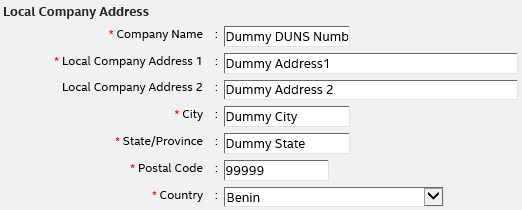
(Optional) Update the Local Company Address section.
|
| 7 | Click Save. |
| Step | Action |
| 1 | Go to supplier.intel.com. |
| 2 | Click Sign In > enter your User ID and Password > click Sign In. |
| Result: The Supplier Information page is displayed. | |
| 3 |
Click Manage My Account.
|
| Result: The Manage my Account page is displayed. | |
| 4 |
Click Remove Access.
|
| 5 | Click Remove Access. |
Notes: Perform this action if and only if
|
|
| Result: All your access to applications on supplier.intel.com is removed. You have to submit new application request in case you would like to restore your access in the near future. |
| Step | Action |
| 1 | Go to supplier.intel.com. |
| 2 | Click Sign In > enter your User ID and Password > click Sign In. |
| Result: The Supplier Information page is displayed. | |
| 3 |
Click Manage My Account.
|
| Result: The Manage my Account page is displayed. | |
| 4 |
Click Change Password.
|
|
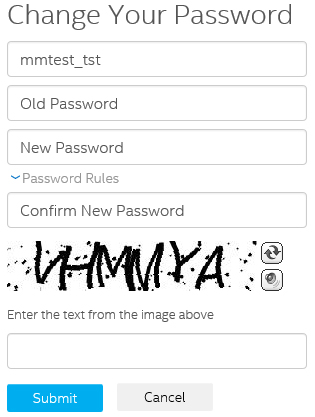
Result: The Change your Password page is displayed.
|
|
| 5 | Update all the form fields. |
| 6 | Click Submit. |
| Result: Your new password is recorded. | |
| Note: You may now log in using your user ID and new password. |